Using The MedPaper LLM Wiki
This guide explains how to use the current MedPaper LLM wiki after the recent Foam-aligned changes.
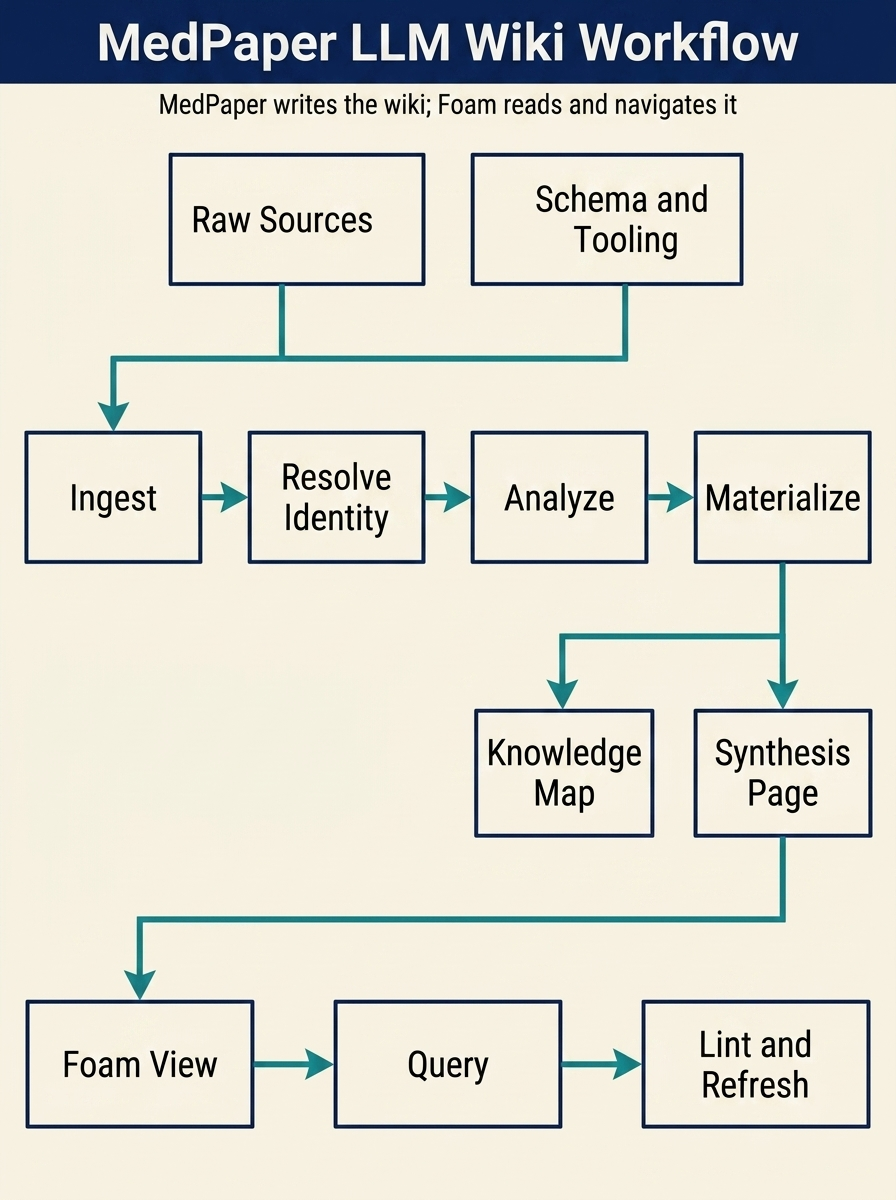
What "LLM Wiki" Means Here
In this repository, an LLM wiki is not a chat transcript and not a pure query-time RAG layer.
It is a persistent markdown knowledge layer that sits between raw sources and your future questions:
- raw sources stay immutable
- MedPaper writes and updates the wiki pages
- Foam lets you browse, link, preview, query, and navigate the result
The conceptual reference for this pattern is documented in
docs/reference/llm-wiki.md.
What Changed In This Version
The recent adjustments made the wiki more usable inside Foam:
- reference notes now carry standardized
typeandtags - reference notes now expose stable block anchors such as
^key-findingsand^evidence-methods - knowledge maps and synthesis pages now emit
foam-queryblocks - knowledge maps and synthesis pages now embed note-to-note evidence blocks
- Library Wiki Path now provisions
review/anddaily/ write_library_notenow supports template-driven capture forcapture,review, anddailybuild_library_dashboardnow materializes graph-health, unread, metadata, review, assets, and synthesis dashboards- reference graph rebuild now emits publish-safe notes under
notes/publish/ update_project_settings(graph_views_json="...")now writes project-specific Foam graph slices
Before You Start
Recommended setup:
- Install and enable Foam in the workspace.
- In the VSIX version, set
mdpaper.toolSurfacetofullif you want the orchestration tools directly available. - Work inside one MedPaper project at a time so Foam autocomplete and graph remain scoped to the active note set.
Relevant orchestration tools:
import_local_papersingest_web_sourceingest_markdown_sourceresolve_reference_identitysave_reference_analysisbuild_knowledge_mapbuild_synthesis_pagematerialize_agent_wiki
What Copilot Now Adds On Top Of Foam
The current integration already covers wikilinks, managed graph views,
block-anchor embeds, and foam-query dashboards. The new library-facing
additions close the biggest gap between a note graph and an operational
research workspace:
| Capability | What you can do now | Materialized output |
|---|---|---|
| Template-driven capture | Create capture, review, or daily notes with normalized frontmatter |
projects/{slug}/inbox/, review/, daily/ |
| Graph-health repair loop | Run build_library_dashboard(view="graph-health") to surface orphans, unresolved wikilinks, placeholders, and metadata gaps |
notes/library/dashboard-graph-health.md, notes/review/graph-repair-worklist.md |
| Richer dashboards | Run build_library_dashboard with unread, metadata, review, assets, synthesis, or queues |
notes/library/dashboard-*.md |
| Publish-safe references | Regenerate graph notes and export-safe reference definitions for non-Foam renderers | notes/publish/reference-links.md, notes/publish/knowledge-base.md |
| Project-specific graph slices | Write custom graph_views_json into project settings and let MedPaper refresh foam.graph.views |
project.json + .vscode/settings.json |
Working graph_views_json Example
If your current question is:
Does remimazolam reduce delirium compared with propofol during ICU sedation?
Use a graph-slice bundle like this:
[
  {
    "name": "ICU Sedation Evidence",
    "property": "tags",
    "value": "topic/remimazolam",
    "color": "#1d3557",
    "background": "#f7fbff",
    "lineColor": "#6c8aa3",
    "hide": [
      {
        "property": "note_domain",
        "value": "asset",
        "color": "#d9d9d9"
      }
    ]
  },
  {
    "name": "Delirium Review Queue",
    "property": "tags",
    "value": "topic/delirium",
    "color": "#9c6644",
    "background": "#fffaf5",
    "lineColor": "#b08968",
    "hide": [
      {
        "property": "analysis_state",
        "value": "completed",
        "color": "#d9d9d9"
      }
    ]
  },
  {
    "name": "Propofol Comparison",
    "property": "tags",
    "value": "topic/propofol",
    "color": "#264653",
    "background": "#f6fffb",
    "lineColor": "#4f6d7a",
    "hide": [
      {
        "property": "note_domain",
        "value": "writing",
        "color": "#d9d9d9"
      }
    ]
  }
]
Apply it through update_project_settings(graph_views_json="..."). The JSON
is stored in project.json under settings.custom_graph_views, and MedPaper
rewrites the active Foam graph views automatically.
If your library uses MeSH or different keyword tags, replace
topic/remimazolam, topic/delirium, and topic/propofol with the actual
normalized tag values present in your notes.
Library-Wiki Operating Manual
- Create a project with
workflow_mode="library-wiki". - Capture notes into
inbox/ordaily/withwrite_library_note, usingtemplate="capture",template="review", ortemplate="daily". - Promote durable notes with
move_library_note,triage_library_note,create_concept_page, ormaterialize_concept_page. - Run
build_library_dashboard(view="graph-health")after each ingest or triage batch, then open the generated dashboard and repair worklist notes in Foam. - Add project-specific graph views with
update_project_settingsonce the main topic tags are stable. - Materialize or refresh synthesis pages with
materialize_agent_wiki, then use the publish-safe notes undernotes/publish/when sharing outside Foam.
The Practical Operating Loop
1. Ingest A Source
Use one of these depending on where the source comes from:
- local file:
import_local_papers - markdown text or markdown file:
ingest_markdown_source - web snapshot already converted to markdown/text:
ingest_web_source
Result:
- a canonical reference directory is created under
projects/{slug}/references/ - a Foam-readable reference note is materialized
- source artifacts and metadata are persisted
notes/index.mdandnotes/log.mdare updated
2. Resolve Identity When Better Metadata Exists
If a local or extracted source later maps to a verified PMID or richer metadata,
run resolve_reference_identity.
Use this when:
- a local PDF becomes a verified PubMed record
- a web or markdown note should be promoted into a canonical reference
- you want stable aliases and one durable note identity
Result:
- the source note keeps its history and aliases
- canonical identifiers replace temporary local IDs
- artifacts and prior analysis are preserved
3. Save Analysis
Once a reference has been reviewed, save a structured summary with
save_reference_analysis.
This is what turns a note from simple storage into something the wiki can reason over and reuse later.
Good analysis input should include:
- one short synthesis summary
- likely manuscript usage sections
- contradictions or uncertainty when present
4. Materialize The Wiki Layer
Use materialize_agent_wiki when you want the bundle in one pass.
That creates:
- a knowledge map page
- a synthesis page
You can also run build_knowledge_map and build_synthesis_page separately if
you want tighter control.
Resulting files typically land under:
projects/{slug}/notes/index.mdprojects/{slug}/notes/log.mdprojects/{slug}/notes/library/projects/{slug}/notes/knowledge-maps/projects/{slug}/notes/publish/projects/{slug}/notes/synthesis-pages/
How To Read The Output In Foam
Reference Notes
Each reference note now gives you:
- aliases for wikilink completion
- standardized
typeandtags - a
Key Findingsblock with a stable anchor - section-level evidence blocks with anchors such as
^evidence-methods
Examples:
[[citation_key]][[citation_key#^key-findings]]![[citation_key#^key-findings]]![[citation_key#^evidence-methods]]
Knowledge Map Pages
Knowledge maps are now better than static summaries.
They contain:
- a scope section
- a live reference count query
- a live reference table query
- an embedded evidence section that pulls note content from the underlying reference pages
Use them when you want a topic overview and a navigable evidence surface.
Synthesis Pages
Synthesis pages are where you turn references into a working position.
They now contain:
- the current synthesis text
- the evidence base list
- a live evidence table query
- embedded evidence snippets from the linked reference notes
Use them when you want a draftable, updateable interpretation rather than just an inventory.
A Minimal Example Workflow
Example sequence for one web article or markdown note:
- ingest the source with
ingest_web_sourceoringest_markdown_source - if a better identifier exists, run
resolve_reference_identity - save one structured analysis with
save_reference_analysis - run
materialize_agent_wiki - open the resulting knowledge map and synthesis page in Foam
- query the wiki, then promote valuable answers back into markdown pages
When To Create New Wiki Pages
Promote a chat result into the wiki when it becomes reusable knowledge.
Good candidates:
- a comparison that will be reused later
- a topic-level contradiction summary
- a synthesis that now represents your current position
- a decision record about why one evidence line was trusted over another
Bad candidates:
- one-off conversational filler
- low-confidence speculation not tied to persisted sources
What The Human Still Owns
The LLM writes the wiki, but you still own:
- source selection
- review of important summaries
- what deserves canonical identity
- how contradictions should be resolved in your domain
- when a synthesis is strong enough to promote into manuscript work
Current Limits
These are the main limits that still matter in day-to-day use:
- registered figure/table notes now expose summary, review, bbox, and matched source-fragment anchors, but not every underlying layout-level snippet is anchored yet
- imported reference notes now link out to materialized journal/author/topic context hubs, but those taxonomy notes are still intentionally lightweight
- asset graph notes currently summarize registered figures/tables, not every possible fragment-level evidence card
- managed graph views are exposed as MedPaper commands, and project-specific
graph_views_jsonslices now flow through project settings, but fully ad hoc inline Foam graph configs still rely on native Foam keybindings - embedded evidence currently favors the key findings block and summary excerpts, not every possible evidence fragment
What Makes A Personal Knowledge Base Feel Complete
In practice, a MedPaper + Foam knowledge base starts to feel complete when:
- every kept source becomes a canonical note or is explicitly discarded
- every reusable claim graduates from a raw reference note into a concept, knowledge-map, or synthesis page
- every important note carries enough frontmatter to appear correctly in graph, queries, and tag-driven navigation
- every critical evidence fragment has a stable anchor that can be linked or embedded later
- every orphan, placeholder, and contradiction cluster is turned into an explicit review note instead of remaining implicit
- daily capture plus periodic triage keeps
inbox/,daily/, andgraph-repair-worklist.mdfrom becoming dead storage
Related References
docs/reference/llm-wiki.mddocs/reference/foam.mdmemory-bank/kb-integration-blueprint.md